

Script
Script - Get Script and Transfer Rx
See Script API reference for request message fields.
This API lets HealthDyne clients query (GET) prescription info. The Script API can also be used by a pharmacy to send a prescription transfer request (POST) from their pharmacy to HealthDyne.
Get Script
The Script API (GET) allows clients to retrieve prescription information for a specific scriptKey.
Server
Only https connections are accepted.
| REQUEST TYPE | ENDPOINT |
|---|---|
| GET (Test) | api.uat-healthdyne.com/v2/script?scriptKey=<scriptKey> |
| GET (Prod) | api.healthdyne.com/v2/script?scriptKey=<scriptKey> |
Header
| Key | Value |
|---|---|
| Accept | application/json |
| Content-Type | application/json |
| HealthDyne-Subscription-Key | Provided by HealthDyne |
Sample GET Request
https://api.uat-healthdyne.com/v2/script?scriptkey=092723-123876A
This tells the API to query for scriptKey 092723-123876A and return relevant details.
GET Script Response
The below table lists the potential response codes that can be received in response to a GET request.
| Code | Description |
|---|---|
| 200 | Prescription details returned |
| 204 | No Prescription found |
| 400 | Bad Request – typically header is missing key |
| 401 | Unauthorized |
| 500 | Internal Server Error |
Sample Status Response
{
  "ScriptKey": "092723-123876A",
  "prescription": {
    "rxNumber": "10494303",
    "dispenseQuantity": "7",
    "rxStatus": "Active",
    "clinicCode": "12345ABC",
    "medicationPrescribed": {
      "writtenDrugName": "B COMPLEX CAP",
      "writtenDrugNdc": "00536478701",
      "quantityWritten": "10",
      "writtenDate": "09-27-2023",
      "expirationDate": "01-27-2024",
      "strength": "10",
      "strengthUOM": "MG",
      "dosageForm": "TABLET"
    },
    "medicationDispense": {
      "drugNdc": "00536478701",
      "drugGPI": "00536478701",
      "drugName": "B COMPLEX CAP",
      "daysSupply": "10",
      "strength": "10",
      "strengthUOM": "MG",
      "dosageForm": "TABLET",
      "sigInstructions": "TAKE 1 TABLET DAILY",
      "daw": "0",
      "refillsAuthorized": "2"
    },
    "lastFillDate": null,
    "patientKey": "JWf782u3409wsed",
    "fillsRemaining": "6",
    "quantityRemaining": "180",
    "metricQuantity": "",
    "nextFillDate": null,
    "provider": {
      "name": "UBARRA",
      "npi": "1487737227",
      "stateLicenseNumber": null,
      "dea": null
    },
    "supervisor": {
      "lastName": "UBARRA",
      "firstName": "UBARRA",
      "npi": "1487737227",
      "stateLicenseNumber": "1487737227",
      "dea": "1487737227"
    }
  }
}
Get Patient Scripts/prescriptions
The "Get Patient script/Prescription" endpoint allows retrieval of all scripts associated with a specific patient key. If no prescriptions are found for the provided patient key, the endpoint will return a 200 status with the message "No record found."
Server
Only https connections are accepted.
| REQUEST TYPE | ENDPOINT |
|---|---|
| GET (Test) | api.uat-healthdyne.com/v2/patient/prescription?patientKey=<patientKey> |
| GET (Prod) | api.healthdyne.com/v2/patient/prescription?patientKey=<patientKey> |
Header
| Key | Value |
|---|---|
| Accept | application/json |
| Content-Type | application/json |
| HealthDyne-Subscription-Key | Provided by HealthDyne |
Sample GET Request
This tells the API to query for patientKey 4e1e76ca-520f-4e7a-a6c7-d837a9e3cece and returns a list of all scripts associated to that patient.
GET Patient Script Response
The below table lists the potential response codes that can be received in response to a GET request.
| Code | Description |
|---|---|
| 200 | Prescription details returned |
| 204 | No Prescription found |
| 400 | Bad Request – typically header is missing key |
| 401 | Unauthorized |
| 500 | Internal Server Error |
Sample Status Response
{
    "scriptKeys": [
        "0ed290dbb11224ea0f9e27",
      	"0ed290dbb114ea0f9e27981",
      	"0ed290dbb11224ea0f9e232167"
    ]
}
Rx Transfer
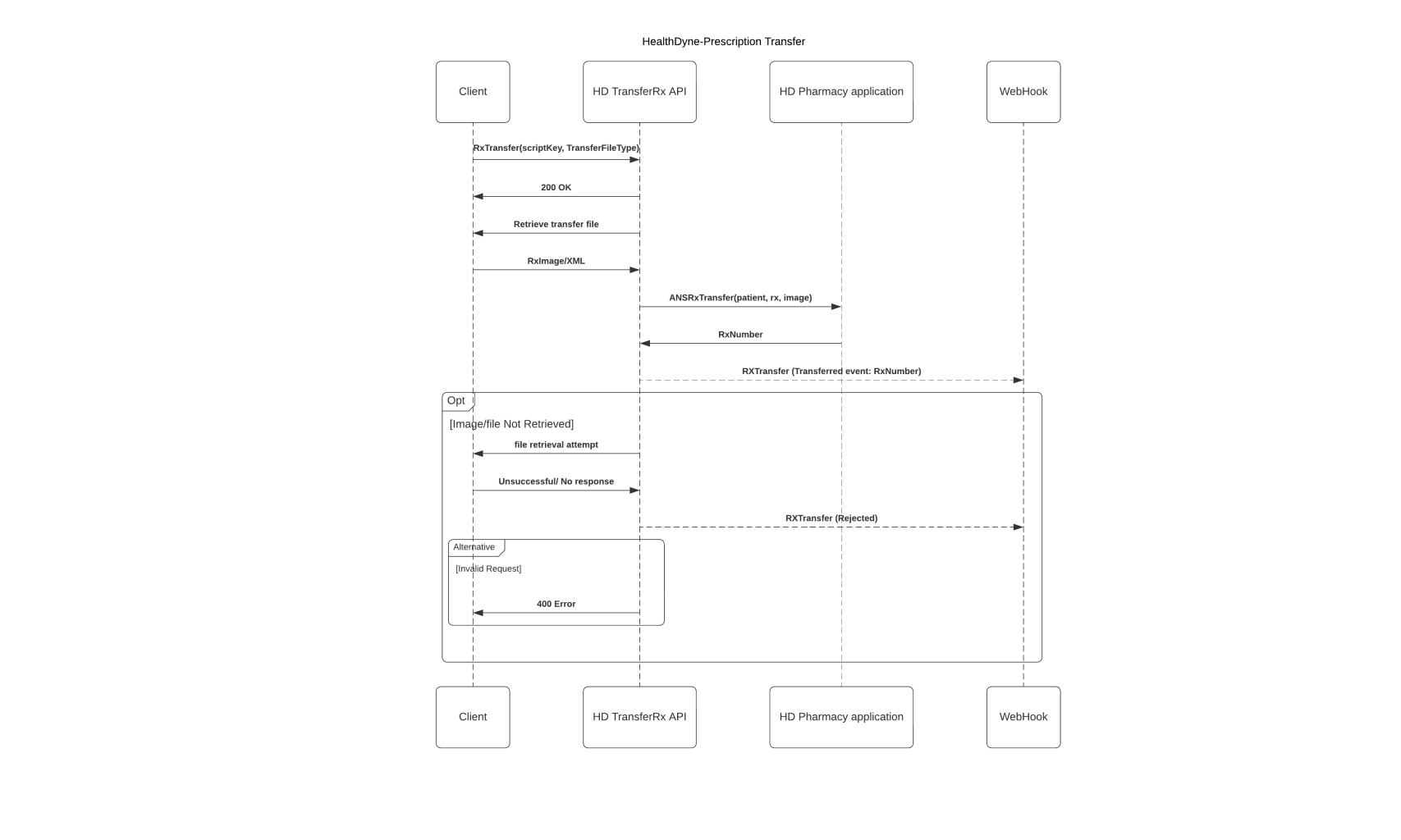
The Rx Transfer process is only available to registered pharmacies and requires direct integration between sending and receiving pharmacies. Prescription transfers also require the sending pharmacy to share a URL in the API call for HealthDyne to retrieve either:
- A PNG image of the prescription
- A PDF file of the prescription
- A XML file containing only the Surescript XML
API field validation information in Appendix Script / RxTransfer Fields
Server
Only https connections are accepted.
| REQUEST TYPE | ENDPOINT |
|---|---|
| POST (Test) | api.uat-healthdyne.com/v2/script |
| POST (Prod) | api.healthdyne.com/v2/script |
Header
| Key | Value |
|---|---|
| Accept | application/json |
| Content-Type | application/json |
| HealthDyne-Subscription-Key | Provided by HealthDyne |
Sample Script Request
{
  "scriptKey": "e156daa5-1905-42c5-9e2e",
  "sendingPharmacy": {
    "pharmacyName": "MyPharmacy",
    "pharmacyNpi": "981000000999",
    "pharmacyNcPdp": "981000000999",
    "deaNumber": "981000000999",
    "phone": "1234567890",
    "fax": null,
    "pharmacist": {
      "firstName": "John",
      "lastName": "Doe"
    },
    "contact": {
      "contactType": "Phone",
      "contactAddress": "6789012345"
    },
    "address": {
      "line1": "401 My Pharmacy Dr.",
      "line2": null,
      "city": "Lakeland",
      "state": "FL",
      "zipCode": "33810"
    }
  },
	"receivingPharmacy": {
		"pharmacyName": "HEALTHDYNE",
		"pharmacyNpi": "1093974982",
    "pharmacyNcPdp": "1093974982",
		"deaNumber": "1093974982",
		"phone": "3456789012",
		"fax": null,
		"pharmacist": {
			"firstName": "Phil",
			"lastName": "Doe"
		},
    "contact": {
      "contactType": "Phone",
      "contactAddress": "3456789012"
    },
    "address": {
      "line1": "500 Eagles Landing Dr.",
      "line2": null,
      "city": "Lakeland",
      "state": "FL",
      "zipCode": "33810"
    }
  },
  "patientKey": "12389990",
  "prescription": {
    "prescriber":{
      "firstName":"Doctor",
      "lastName":"Doe",
      "npi":"1093456789",
      "dea": "1093456789",
      "phoneNumber": "5556667777",
      "phoneNumberExtension": null,
      "faxNumber": null,
      "address": {
        "line1": "123 Doctor Lane",
        "line2": null,
        "city": "Lakeland",
        "state": "FL",
        "zipCode": "33810"
      }
    },
    "rxNumber": "45678",
    "prescribedNdc": "56789010211",
    "prescribedDrugName": "Tylenol",
    "dispenseNdc": "56789010212",
    "dispenseDrugName": "Ibuprofen",
    "drugDosageForm": "TABS",
    "drugStrength": "500mg",
    "daysSupply": 90,
    "quantityWritten": 180,
    "firstFillDispensedQuantity": 90,
    "quantityDispensedToDate":90,
    "remainingQuantity": 90,
    "labelDirections": "TAKE 1 TABLET DAILY",
    "writtenDate": "2022-04-04",
    "expirationDate": "2022-06-04",
    "dawCode": "0",
    "refillsAuthorized": "1",
    "lastFillDate": "2022-04-04",
    "firstFillDate": "2022-04-04",
    "fillsToDate": 1,
    "refillsLeft": 1,
    "refillsTransferred": 1,
    "currentFillNumber": "2"
  },
  "transferFileType": "PNG",
  "transferFileUrl": "aHR0cDpcXFNjb29ieURvb2J5RG9vLmNvbQ",
  "ortransfer": false
}
Script Outbound Transfer
This prescription transfer API allows the client to initiate an outbound prescription transfer from HealthDyne to a pharmacy of the patient’s choice, by fax. For receiving pharmacies in states that restrict prescription transfers, our pharmacy may decline the API request. Once the API is successfully called, outbound prescriptions will no longer be fillable in HealthDyne systems.
Server
Only https connections are accepted.
| REQUEST TYPE | ENDPOINT |
|---|---|
| POST (Test) | api.uat-healthdyne.com/v2/script/transfer |
| POST (Prod) | api.healthdyne.com/v2/script/transfer |
Header
| Key | Value |
|---|---|
| Accept | application/json |
| Content-Type | application/json |
| HealthDyne-Subscription-Key | Provided by HealthDyne |
Sample Script Outbound Request
{
  "patientKey": "PAT-2024-001",
  "scriptKey": ["RX-2024-001", "RX-2024-002"],
  "fulfillingPharmacy": {
    "pharmacyName": "HealthCare Plus Pharmacy",
    "pharmacy_Phone": "1234516790",
    "pharmacy_Fax": "2234567890",
    "address": {
      "line1": "123 Main Street",
      "line2": "Suite 200",
      "line3": "Medical Plaza",
      "city": "Los Angeles",
      "state": "FL",
      "zipCode": "90210",
      "countryCode": "US"
    }
  },
  "notes": "Patient requires temperature-controlled medication storage and delivery confirmation"
}
Click here to see Submit Script Outbound Request Data Object
Sample Script Outbound Response
{
  "scriptKey": [
    "RX-2024-001",
    "RX-2024-002"
  ],
  "message": "All script transfer requests are being processed.",
  "success": true,
  "processingScripts": [
    "RX-2024-001",
    "RX-2024-002"
  ],
  "transferFailedScript": []
}
Click here to see Submit Script Outbound Response Data Object
Status Events
Please see the RxTransfer status events under the Mailbox API guide for a detailed list of status events.
Transferred Status
Once the PNG or XML has been successfully downloaded, HealthDyne will store the file and create the prescription record in HealthDyne's pharmacy management system. Once the Rx has been created, HealthDyne will generate a ‘Transferred’ event. See RxTransfer Transferred Status Event.
Routed Status
Upon a successfully transferred to the pharmacy, the system sends a mailbox event and updates the status to Routed in the HealthDyne System. See RxTransfer Routed Status Event
RoutingFailed Status
Upon a failed prescription transfer to the pharmacy, the system sends a mailbox event and updates the status to RoutingFailed in the HealthDyne System. See RxTransfer RoutingFailed Status Event
Updated about 1 year ago